Receiver templates
Experimental. exo-v2v 0.1.0 is an early release, validated in one lab (ESXi 7.0 U3 to Exoscale ch-gva-2). Try it on non-critical VMs first; commands and behaviour may change.
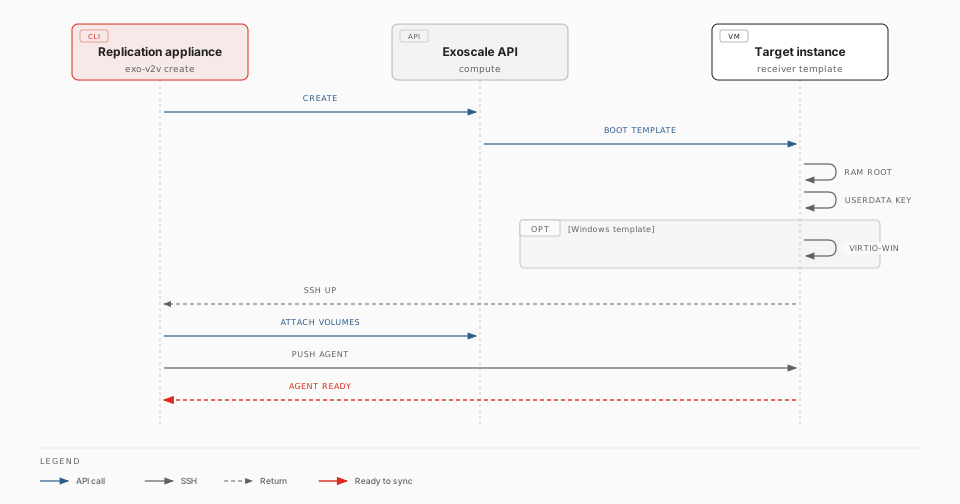
A receiver template is an Exoscale template that boots straight into the
exo-v2v receiver: a Linux system that runs entirely from RAM, so the
migration can overwrite the instance's own disk. With a receiver template,
exo-v2v create takes about one minute instead of 5 to 15, and the target
instance needs no access to package mirrors.
Without one, create starts the target instance from a stock Linux template,
installs the conversion tools on it and switches it into RAM (kexec). Both
ways produce the same receiver; the rest of the migration is identical.
Availability
Exoscale does not publish receiver templates yet: build and register your own (below). Exoscale-published Windows variants would carry the Windows licence, so a migrated Windows guest would run on a Windows-licensed instance. Until then, contact Exoscale about licensing before migrating Windows guests.
Variants
The template's boot mode must match the VM's firmware. One image boots in both modes, with or without Secure Boot (Canonical-signed shim, GRUB and kernel), so Secure Boot is chosen per instance, not per template.
| Template | Boot mode | For |
|---|---|---|
exo-v2v-linux-uefi |
UEFI | Linux VMs with UEFI firmware |
exo-v2v-linux-legacy |
legacy | Linux VMs with BIOS firmware |
exo-v2v-windows-uefi |
UEFI | Windows VMs with UEFI firmware |
exo-v2v-windows-legacy |
legacy | Windows VMs with BIOS firmware |
The Windows variants also carry the virtio-win drivers and rhsrvany that virt-v2v needs to convert Windows guests. A Windows VM with BIOS firmware keeps BIOS on Exoscale: no conversion to UEFI is needed.
Use
exo-v2v plan web01 --vm web01 --zone ch-gva-2 \
  --receiver-template exo-v2v-linux-uefi [--receiver-template-visibility private]
exo-v2v create web01
plan refuses a template whose boot mode does not match the VM. The receiver
logs in as v2v; exo-v2v handles that.
Build and register
template/receiver.pkr.hcl
builds the image and registers both boot-mode variants with Exoscale's
Packer plugin. Run it on
Ubuntu 24.04, as a user with passwordless sudo, with an Exoscale API key that
can register templates and write to an existing Object Storage bucket:
sudo apt-get install -y mmdebstrap qemu-utils gdisk dosfstools grub-pc-bin grub-efi-amd64-signed shim-signed
export EXOSCALE_API_KEY=EXO… EXOSCALE_API_SECRET=…
packer init template/
packer build -var flavour=linux   -var image_bucket=BUCKET template/   # exo-v2v-linux-uefi, -legacy
packer build -var flavour=windows -var image_bucket=BUCKET template/   # exo-v2v-windows-uefi, -legacy
| Variable | Default | Meaning |
|---|---|---|
flavour |
linux |
linux, or windows (adds virtio-win and rhsrvany) |
image_bucket |
Existing bucket in the first zone; the image is removed after import | |
zones |
["ch-gva-2"] |
Zones to register the templates in (templates are per zone) |
template_prefix |
exo-v2v |
Template names: <prefix>-<flavour>-uefi and -legacy |
The recipe runs template/build-image.sh, which you can also run by hand and
register yourself:
sudo template/build-image.sh linux exo-v2v-linux.qcow2       # ~230 MB; windows: ~600 MB
exo storage upload exo-v2v-linux.qcow2 sos://BUCKET/
URL=$(exo storage presign sos://BUCKET/exo-v2v-linux.qcow2 -e 1h)
for m in uefi legacy; do
  exo compute instance-template register exo-v2v-linux-$m "$URL" "$(md5sum < exo-v2v-linux.qcow2 | cut -d' ' -f1)" \
    --zone ch-gva-2 --boot-mode $m --username v2v --disable-password
done
How it works
- The image is a 10 GB disk with a BIOS boot partition and an EFI system partition. GRUB loads the kernel and a ~220 MB initramfs that holds the whole receiver system (virt-v2v, libguestfs, QEMU, filesystem tools). The disk is never mounted.
- At boot the receiver reads the migration's SSH key from the instance user-data, generates its own SSH host keys and starts SSH. The Windows variant first copies virtio-win from the EFI partition into RAM.
createwaits for SSH before attaching the Block Storage volumes, then streams the exo-v2v agent over SSH and starts it.