exo-v2v
Experimental. exo-v2v 0.1.0 is an early release, validated in one lab (ESXi 7.0 U3 to Exoscale ch-gva-2). Try it on non-critical VMs first; commands and behaviour may change.
exo-v2v moves a running VMware vSphere virtual machine to an Exoscale Compute instance. The VM keeps running while its disks are copied; it is stopped only for the final cutover, which took 2 to 9 minutes in our tests, whatever the size of the disks.
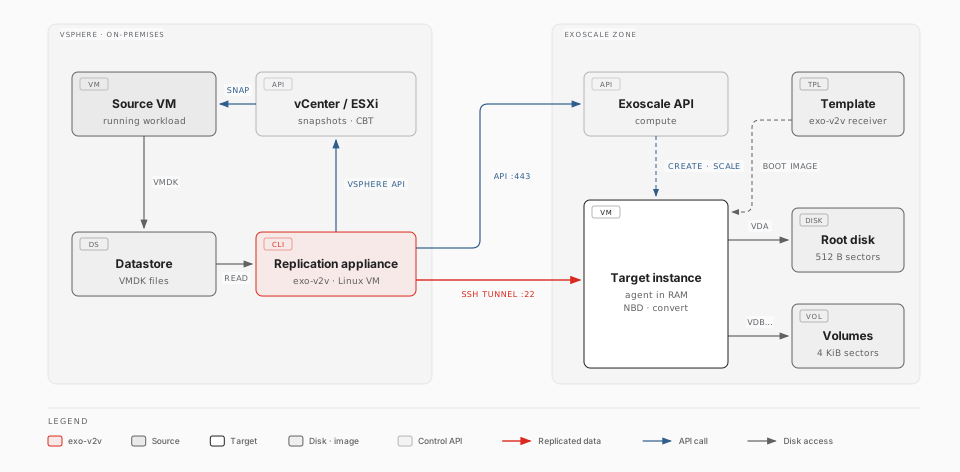
- Replicate while the VM runs. The VM's disks are copied straight to the disks of the target instance, then kept in sync with VMware Changed Block Tracking: each cycle copies only what changed.
- Cut over. The VM is shut down, the last changes are copied, the guest is converted for KVM on the target instance itself, and the instance boots the migrated system from its own disks.
No VDDK, no vSphere plugin, no agent inside the guest, no staging storage.
Where to start
| Page | What it covers |
|---|---|
| How it works | The replication appliance, sync cycles, cutover, guest adaptation, security model |
| Prerequisites | vSphere privileges, the appliance, network flows, Exoscale account |
| IAM role | A least-privilege Exoscale role for the appliance's API key |
| Receiver templates | Templates that boot straight into the receiver, and the Packer recipe that builds them |
| Operations runbook | Step-by-step migration, rollback, troubleshooting |
| Supported operating systems | Tested and expected-to-work guests, measured downtime |
| Limitations | Known limits and their workarounds |
| Architecture | Design details for contributors |
Install
On the replication appliance (a Linux VM in the same vSphere environment, with
Python 3.10 or later and the exo CLI):
pipx install https://github.com/retrack/exo-v2v/releases/download/v0.1.0/exo_v2v-0.1.0-py3-none-any.whl
exo config                          # Exoscale credentials for the exo CLI
export VSPHERE_HOST=vcenter.example VSPHERE_USER=migration@vsphere.local VSPHERE_PASSWORD=…
Migrate a VM
exo-v2v plan    web01 --vm web01 --zone ch-gva-2 --security-group web
exo-v2v create  web01                   # target instance and volumes
sudo -E exo-v2v sync web01              # first cycle: full copy, the VM keeps running
sudo -E exo-v2v sync web01 --every 900  # keep it fresh until the maintenance window
sudo -E exo-v2v cutover web01           # downtime starts here
exo-v2v cleanup web01                   # after you validated the workload
plan prints everything it will do and refuses unsupported VMs; nothing is
created before create. Every step can be repeated or resumed, and
exo-v2v rollback powers the source VM back on until cleanup.
exo-v2v is licensed under the Apache License 2.0. Source: github.com/retrack/exo-v2v.