How exo-v2v works
Experimental. exo-v2v 0.1.0 is an early release, validated in one lab (ESXi 7.0 U3 to Exoscale ch-gva-2). Try it on non-critical VMs first; commands and behaviour may change.
exo-v2v moves a running VMware vSphere virtual machine to an Exoscale Compute instance. The VM keeps running while its disks are copied. It is stopped only for the final cutover, which took 2 to 9 minutes in our tests, whatever the size of the disks.
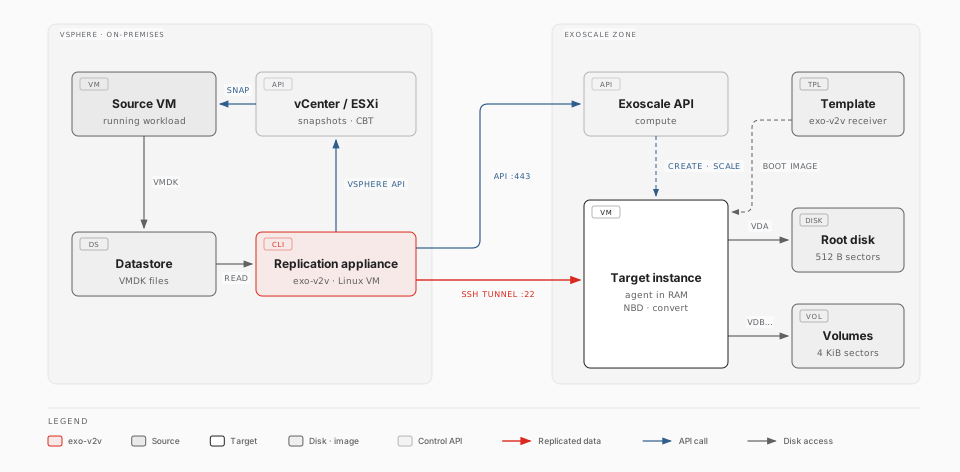
The parts
| Part | Where it runs | What it does |
|---|---|---|
| exo-v2v (CLI) | The replication appliance, a small Linux VM you deploy in the same vSphere environment as the VMs to migrate | Plans the migration, creates the Exoscale resources, copies the disks, drives the cutover |
| Target instance | Your Exoscale zone | The instance that will run the migrated VM. During the migration it runs a temporary agent from memory, so its own disks can be overwritten. It starts either from a receiver template that boots straight into memory (about 1 minute) or from a stock Linux template that installs the tools first (5 to 15 minutes) |
| Root disk and Block Storage volumes | Attached to the target instance | Receive the VM's disks: the first disk becomes the instance's root disk, the others become Block Storage volumes |
There is no intermediate copy: the data lands directly on the disks the migrated VM boots from.
Replicating while the VM runs
exo-v2v uses VMware Changed Block Tracking (CBT), the mechanism backup products use. Each sync cycle copies only what changed since the previous one.
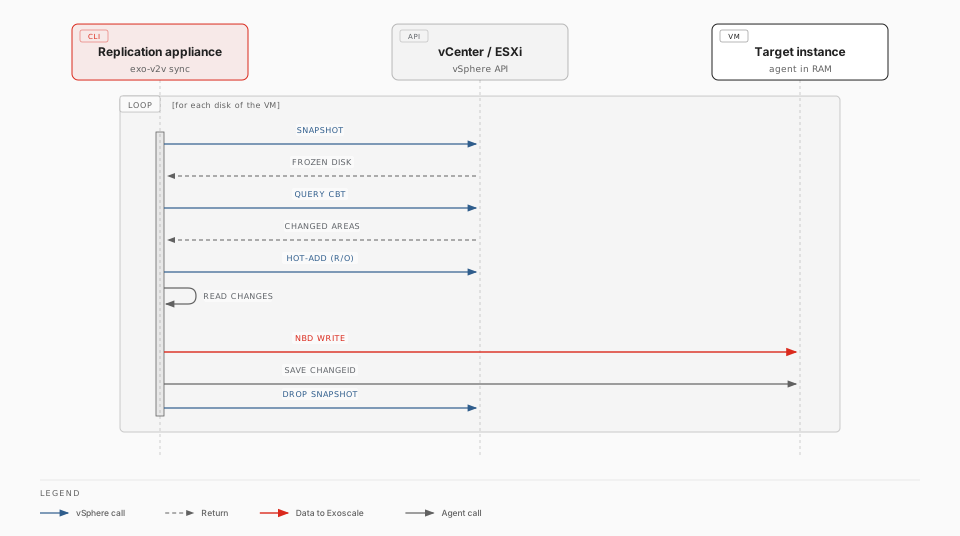
- A short-lived VM snapshot freezes the disks at a point in time.
- vSphere reports which areas changed since the last cycle. The first cycle copies every allocated area.
- The frozen disk is attached read-only to the appliance (hot-add). The appliance reads the changed areas and writes them to the target instance through an SSH tunnel.
- The target instance records the cycle's change ID; the snapshot is deleted.
No VMware software development kit (VDDK) is needed, and nothing is installed
inside the VM. Run exo-v2v sync NAME --every 900 to start a cycle every 15 minutes until
your maintenance window.
The migration lifecycle
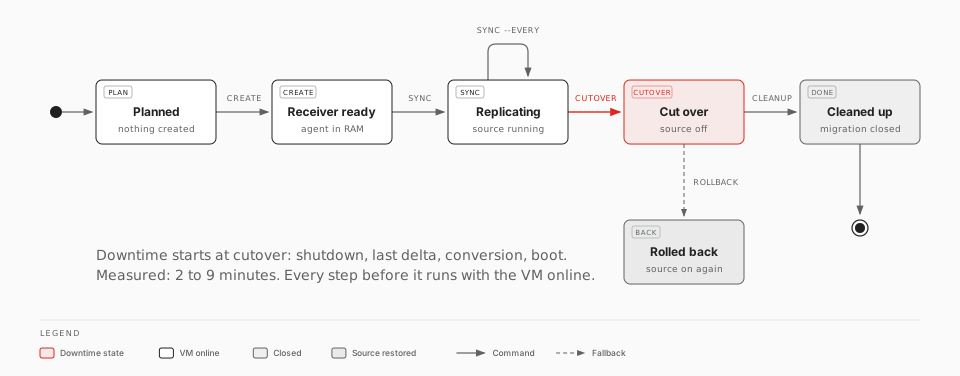
| Step | Command | The source VM |
|---|---|---|
| Check the VM and size the instance | exo-v2v plan |
Untouched |
| Create the target instance and volumes | exo-v2v create |
Untouched |
| First copy, then keep it fresh | exo-v2v sync [--every SECONDS] |
Running |
| Switch over | exo-v2v cutover |
Shut down: downtime starts |
| Validate, then close the migration | exo-v2v cleanup |
Off, kept until you delete it |
Every step can be repeated or resumed after an interruption. Until
cleanup, exo-v2v rollback powers the source VM back on and stops the
Exoscale instance.
What happens at cutover
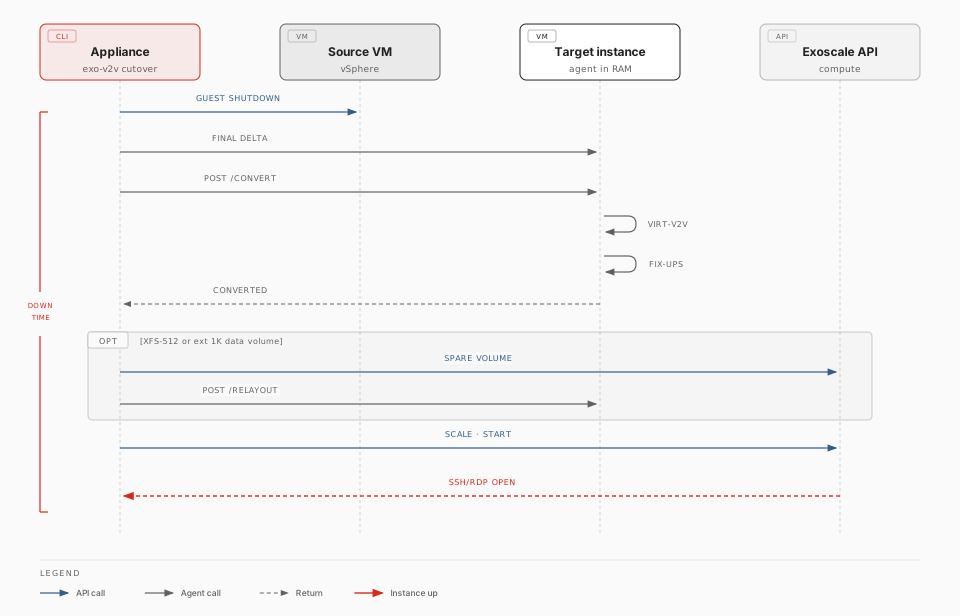
- The VM is shut down through VMware Tools (or powered off after a timeout), and the last changes are copied.
- The guest is converted for the KVM hypervisor on the target instance
itself, with
virt-v2v-in-place: virtio drivers, boot loader and initramfs, removal of VMware Tools. - exo-v2v adapts the guest to Exoscale (see below).
- The instance restarts from its own disks, is scaled to its final instance type, receives your security groups, and exo-v2v waits until SSH (Linux) or RDP (Windows) answers.
Downtime is the sum of the shutdown, the last delta, the conversion (2 to 5 minutes) and the boot. Run a sync shortly before the cutover so that the last delta is small. Measured values per guest are in Supported operating systems.
Adapting the guest to Exoscale
These adjustments are automatic:
| Difference | What exo-v2v does |
|---|---|
| Network interfaces get new names and MAC addresses | A first-boot service maps the old interface names in the network configuration to the new ones, removes VMware MAC pinning, and falls back to DHCP |
| Block Storage volumes use 4096-byte sectors; VMware disks use 512 | Partition tables are rewritten for 4096-byte sectors. NTFS volumes are adapted in place. XFS and ext filesystems that only work with 512-byte sectors are rebuilt on a new volume with the same identifiers, and the original volume is kept as a rollback copy |
| Windows keeps new disks offline | A first-boot task sets the SAN policy to OnlineAll and brings the data disks online |
| Secure Boot and TPM | The instance is created with Secure Boot and a TPM when the source VM has them |
| SELinux guests | Files exo-v2v adds are labelled correctly, so no relabelling reboot is needed |
Security model
- The appliance needs an Exoscale API key limited to Compute (see IAM role) and a vSphere account allowed to snapshot the VMs.
- Each migration gets its own SSH key and its own security group. That group opens TCP 22 only, and only to the appliance's public address. No other port is exposed during replication.
- The data stream runs inside SSH. The agent's disk export and control API listen on the instance's loopback interface only.
- Snapshots are read through a read-only attachment; exo-v2v never writes to the source VM's disks.